Privacy at the storage layer: what Accumulo taught me about data lakes
Apache Accumulo puts a security label on every single cell, and only shows you the cells you're cleared for. A look at how that works for GDPR, medical and legal records, where it falls short, and how modern data lakes do it instead.
Years ago, on Microsoft's air-gapped cloud work, I used Apache Accumulo. I got it working, but I never felt I really understood it. Data work has always been abstract to me. I think in pictures, my "3D brain", and I find it hard to explain things I can't see.
So this week I built a small demo to see it properly, with fake medical and legal records. I found a few things I'd missed the first time. This post is what I learned.
One record, many readers
Most data has more than one audience. A hospital record has a name, a diagnosis, a county and a note from a solicitor. A doctor should see the diagnosis. An analyst counting visits by county should not see the name. A legal team might need the note, and nobody else should.
The usual fix is to copy the data. One table for clinicians, a cleaned-up one for analysts, another for legal. Now you have three copies to keep in sync, and three places to forget when someone asks you to delete their data.
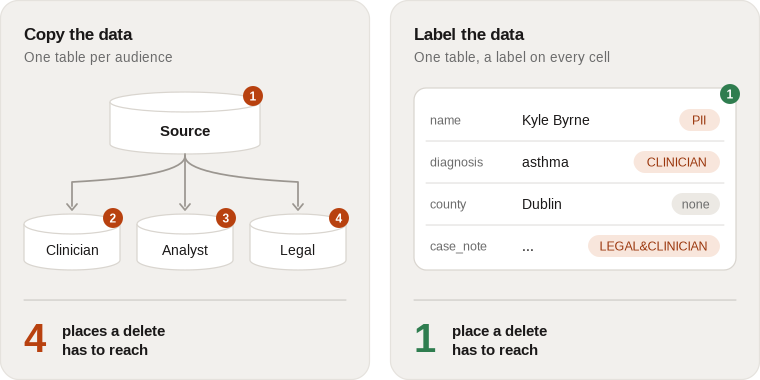 Copies multiply the places a delete has to reach.
Accumulo does something different. The storage itself decides what each person can see.
A label on every cell
Accumulo is a big, sorted key-value store, a lot like Google's Bigtable. It came out of the NSA, where mixing data with different clearance levels in one place was the whole point.
Every value in Accumulo carries a visibility label: a small expression like
PII or LEGAL&CLINICIAN. Every user carries a set of authorisations. When
you read, Accumulo checks each cell's label against your authorisations, and
skips the ones you can't see. You don't get an error. The cells just aren't
there for you.
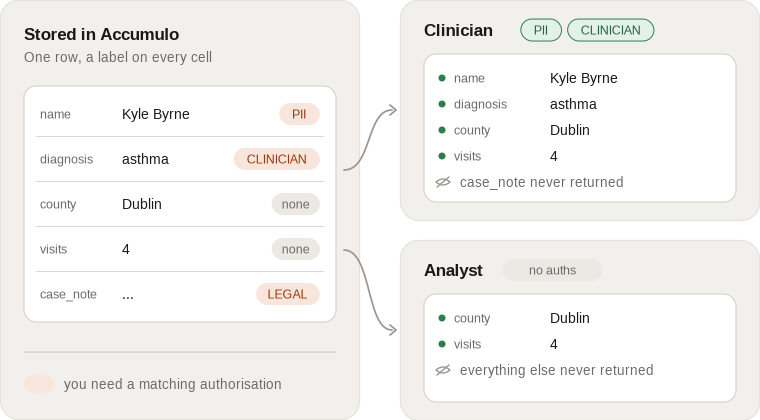 Same row, two readers. Nobody made a second copy.
In the Accumulo shell it looks like this:
# -evc: only allow labels the writer holds, so a typo is rejected
createtable -evc patients
setauths -u root -s PII,CLINICIAN,LEGAL

# label each cell as you write it
insert p123 info name "Kyle Byrne" -l PII
insert p123 info diagnosis "asthma" -l CLINICIAN
insert p123 info county "Dublin"
insert p123 info visits "4"
insert p123 legal case_note "..." -l LEGAL
insert p123 legal medical_evidence "..." -l LEGAL&CLINICIAN

# create the clinician (it asks for a password), let them read the table,
# and give them their authorisations
createuser clinician
grant Table.READ -t patients -u clinician
setauths -u clinician -s PII,CLINICIAN

# log in as the clinician and read: the legal cells are skipped
user clinician
scan -t patients
Labels can be combined with & (and) and | (or). So CLINICIAN|LEGAL means
either team can see it, and LEGAL&CLINICIAN means you need both.
Why this suits GDPR, medical and legal records
There's only one copy of the data, so there are fewer places to look when someone asks what you hold about them. GDPR asks you to limit who sees personal data, and here the storage does that, instead of every app having to get it right. A medical record can keep public numbers, clinical notes and legal holds in the same row, each with its own rule.
The storage also never returns a cell you're not cleared for, so a bug in an app can't leak it. That's only true when each person logs in to Accumulo as themselves, though. Lots of apps, my demo included, use one service user that holds every label and picks the authorisations for each request. Then a bug that sends the wrong authorisations can still leak cells. My demo has a test for exactly that.
Where it falls short
Building the demo showed me where it gets harder.
Deleting isn't instant
A delete in Accumulo writes a marker, called a tombstone. The old data stays in
the files on disk until a compaction rewrites them. For the GDPR right to
erasure, you need to force that compaction (compact -t patients -w).
Even then, the old files aren't deleted straight away. Accumulo's garbage collector removes them later: its first run is 30 seconds after it starts, then every 5 minutes by default. And the data can still hide in a few more places:
- HDFS trash, if it's turned on, which is common in production. The garbage collector moves old files there instead of deleting them.
- Write-ahead logs, until Accumulo doesn't need them any more.
- HDFS snapshots taken before the delete.
- The disk itself. When HDFS deletes a block, it removes the file but doesn't overwrite the bytes.
- Backups, until they expire.
So for real erasure, you need a plan for each of these, not just the delete.
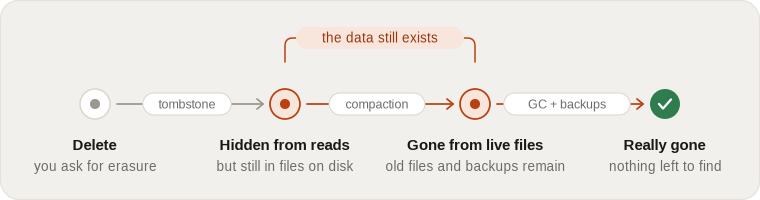 The data still exists for most of the way.
Row keys aren't protected
Labels cover the value, not the row ID. If you use a name or an email as the row key, anyone who can see any cell in that row can see the key. Use an opaque ID instead.
Legal holds pull the other way
A legal hold says "don't delete this". GDPR says "delete this when asked". Labels decide who can see data. They don't decide how long you keep it. You still need a retention process around it.
Labels are a design job
Someone has to decide the label scheme, keep it small, and manage who gets which authorisation. Get it wrong and you either leak data or lock everyone out.
How modern data lakes do it instead
Accumulo never became mainstream outside government and a few regulated companies. Most data lakes today store files in an open table format like Apache Iceberg, on S3 or Azure Blob, and read them with engines like Spark or Trino.
Those files have no labels. Instead, the check moves up a layer, into the catalog and policy layer: tools like Apache Ranger, AWS Lake Formation or Unity Catalog. They add row filters ("only Irish customers") and column masks ("hide the email") when a query runs. Some catalogs go further and hand each query short-lived credentials for only the files it's allowed to read. That's called credential vending.
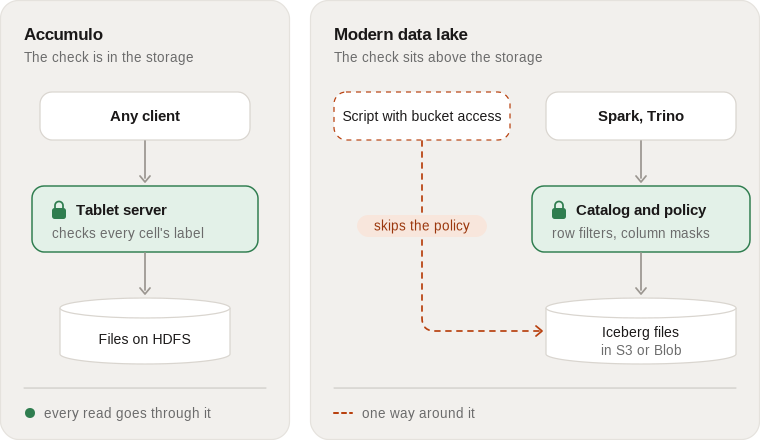 The same goal, with the check in a different place.
Which would I pick?
For most companies, the modern lake. Open formats, many engines, and policies you can change without rewriting data.
But Accumulo's idea still holds up. The closer the access check is to the data, the fewer ways there are around it. With policies in the catalog, every engine has to go through the catalog. If one tool reads the files directly, the policy is gone. Accumulo isn't immune either. Anyone with raw access to its files on HDFS can read them too. But that's a much smaller group to lock down.
Now when I look at any data platform, I ask where the access check really happens, and how long it takes for deleted data to actually be gone.
The demo is on GitHub. You can switch roles, delete a patient, and watch each step until the data is really gone. If you've used Accumulo, Ranger or Lake Formation for this kind of data, I'd like to hear how it went.