SidePulse: a light that tells me when my AI agent needs me
I wrote an OpenCode plugin and a Home Assistant bridge for SidePulse, a tiny LED device that shows what my coding agents are doing. Along the way I sent three fixes upstream.
Coding agents are great until you leave one alone. You switch to another window, and ten minutes later you find it has been sitting on a permission prompt the whole time. Or it failed straight away. Or it finished ages ago.
SidePulse fixes that with a light. It's a tiny LED device that sits in the SD card slot of a MacBook (the Pro), or in a USB-C port (the Dot). Its menu-bar app listens to your agents and shows their state on the LEDs. I glance at the side of my laptop instead of checking the terminal.
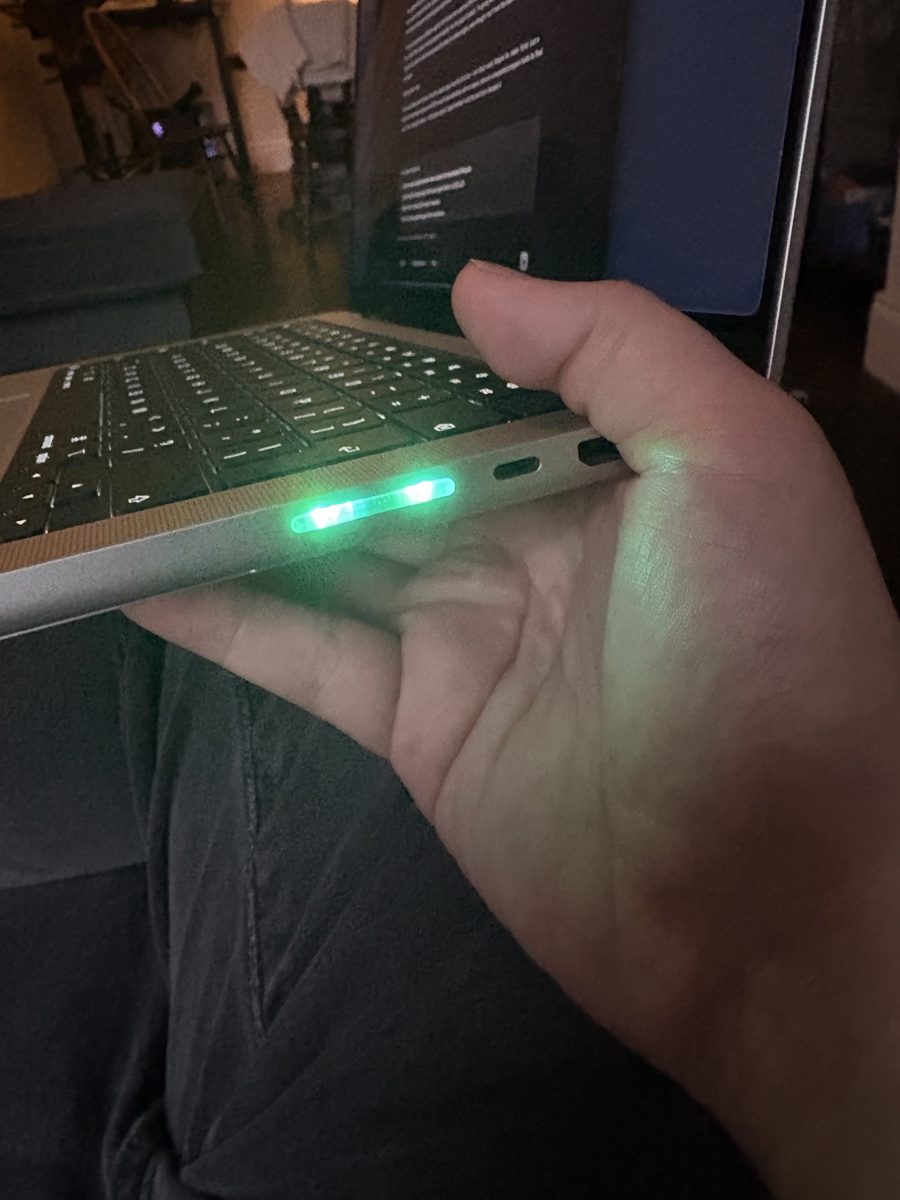
My SidePulse Pro in the SD card slot. Solid green: the turn is done.
SidePulse is made by Peter Kuhar, who shares a lot of it as he builds:
Out of the box it supported Claude Code, Codex and Grok. I use OpenCode a lot, so I wrote a plugin for it. Then I wanted the same status in Home Assistant, so I wrote a bridge. And while doing both, I found a few bugs in the app itself and sent the fixes upstream.

The OpenCode plugin
opencode-sidepulse is on npm. On OpenCode 2 you add it with one command:
opencode plugin add opencode-sidepulseThe colours are simple:
| LEDs | Meaning |
|---|---|
| Cyan comet | The agent is thinking or running a tool. |
| Amber breathing | A permission prompt or a question is waiting for you. |
| Solid green | The turn finished. |
| Red breathing | The turn failed, or OpenCode is retrying a failed call. |
Amber is the one that matters most. It's the colour that saves me from coming back to an agent that did nothing for ten minutes.
Two modes, one writer
The device is a small USB drive with one file, LEDS.LED. You write a short LED
program into the file and the device plays it. That's the whole interface, which
I love.
The catch is that the menu-bar app writes that file too. Two writers on one file fight, and the animation restarts on every write. So the plugin picks a mode:
- App mode: if the app's socket answers, the plugin sends it hook events and never touches the file. The app combines OpenCode with every other agent and shows the most urgent state.
- Direct mode: with no app running, the plugin writes LED programs to the device itself.
Only one process ever writes the device. The plugin has no dependencies and no build step. It uses only the Node standard library, so it runs the same under any OpenCode runtime.
The cancel that kept going green
My favourite bug took three releases. When you cancel a turn, OpenCode sends an error and then an idle event, so the LEDs flashed green as if the turn had finished. I fixed the local state. It still went green, because in app mode the app renders the event, not my state. So I sent every event to a live app, read back what it showed, and built a table of what each one really does.
Then I worked out the target I'd been chasing could never be shown at all, because the app filters out an idle status within the same second.
So I stopped. A cancel now ends like any other turn. You already know you cancelled it, because you did it a second ago. The device should tell you what you can't see: a prompt waiting, a failure, a retry stalling. That change was 31 lines out and 20 in, and the plugin got simpler.
The lesson I keep relearning: test against the real thing. The self-check now replays event traces I captured from real OpenCode sessions, including a cancel, a normal finish and a retry.
Keeping up with OpenCode 2
OpenCode 2 changed how plugins load and how a turn ends, so the plugin now has
one export that works on both OpenCode 1 and 2. I also found that the Dot never
lit up: its drive is called PulseDot, because a FAT drive name holds at most
11 characters, and I was only looking for names starting with sidepulse.
CI tests every pull request and publishes to npm from main with trusted
publishing over OIDC. There's no npm token to store or rotate, which suits me,
because my npm login needs a YubiKey tap that CI can't do.
Fixing things upstream
Building on someone else's app means finding its rough edges. The SidePulse app is open source (inteliwear/sidepulse, MIT), so I sent the fixes back.
- Events silently dropped
(#37, merged). If you set
XDG_STATE_HOMEin your shell, the app (started by macOS, without your shell's settings) and the hooks (started from your shell) looked for the socket in different folders. Every event was dropped, with no error. The menu bar just stayed on the last state. The same PR made the app find any agent's icon from its own app by name, so a new agent like OpenCode needs no code change to get its icon. - One slow client freezing everything (#53, open). The event server read each connection with no timeout. One client that never finished its message stopped the server, and every agent lost live status until a restart. Each connection now gets a 1 second deadline. The test sends a byte every 0.1 seconds, which beats a plain per-read timeout but not a deadline.
- A show command for other tools (#56, open). Other programs can now ask the app to play an LED program for a few seconds, or hold it until cleared, and then go back to live status. While writing it I found that an older animation could write after a newer one had started, so the device showed the wrong program. Writes now check a token under one lock.
Home Assistant
The last piece was getting the status out of my laptop. sidepulse-mqtt is a small Python bridge that runs on the Mac and talks to Home Assistant over MQTT. It adds one device with three entities:
- Agent status: Idle, Working, Ask or Done.
- Needs input: on while an agent waits for you.
- LEDs: a light you can set to any colour or animation from Home Assistant.
That works both ways. Home Assistant can see the agents, and it can use the SidePulse as a notification light. Two blueprints come with it:
- SidePulse alert: flash an LED program when something happens, like the doorbell.
- SidePulse agent waits: send a notification to my phone when an agent has been waiting for input for a while.
The second one is my favourite. I can step away from my desk, and my phone tells me when the agent needs me.
The bridge is one uv script with a single dependency. It runs as a
LaunchAgent, and the MQTT password lives in the macOS Keychain, not in a file. A
test script runs it against a real Mosquitto broker in Docker, with a fake
device, so it never touches the real app.
The LED control and the alerts need the show command from #56. Until that's merged, the two sensors still work with the current app.
What I took away
- Small interfaces are a gift. A file you write a program into, and a socket that takes JSON. That's all I needed to build three things on top.
- Test against the real thing. My self-checks passed for two releases while the device still went green.
- Send the fix back. The app is open source and the maintainer takes fixes, so everyone gets them, not just me. One is merged and two are waiting.
All three are open source: opencode-sidepulse, sidepulse-mqtt and my upstream PRs. If you have a SidePulse and use OpenCode or Home Assistant, give them a go.
